GhidrAssist · Overview
Product overview, capabilities, and workflow orientation for the Ghidra plugin.
GhidrAssist Documentation
GhidrAssist is a comprehensive LLM-powered plugin for Ghidra that enhances reverse engineering workflows through intelligent automation.
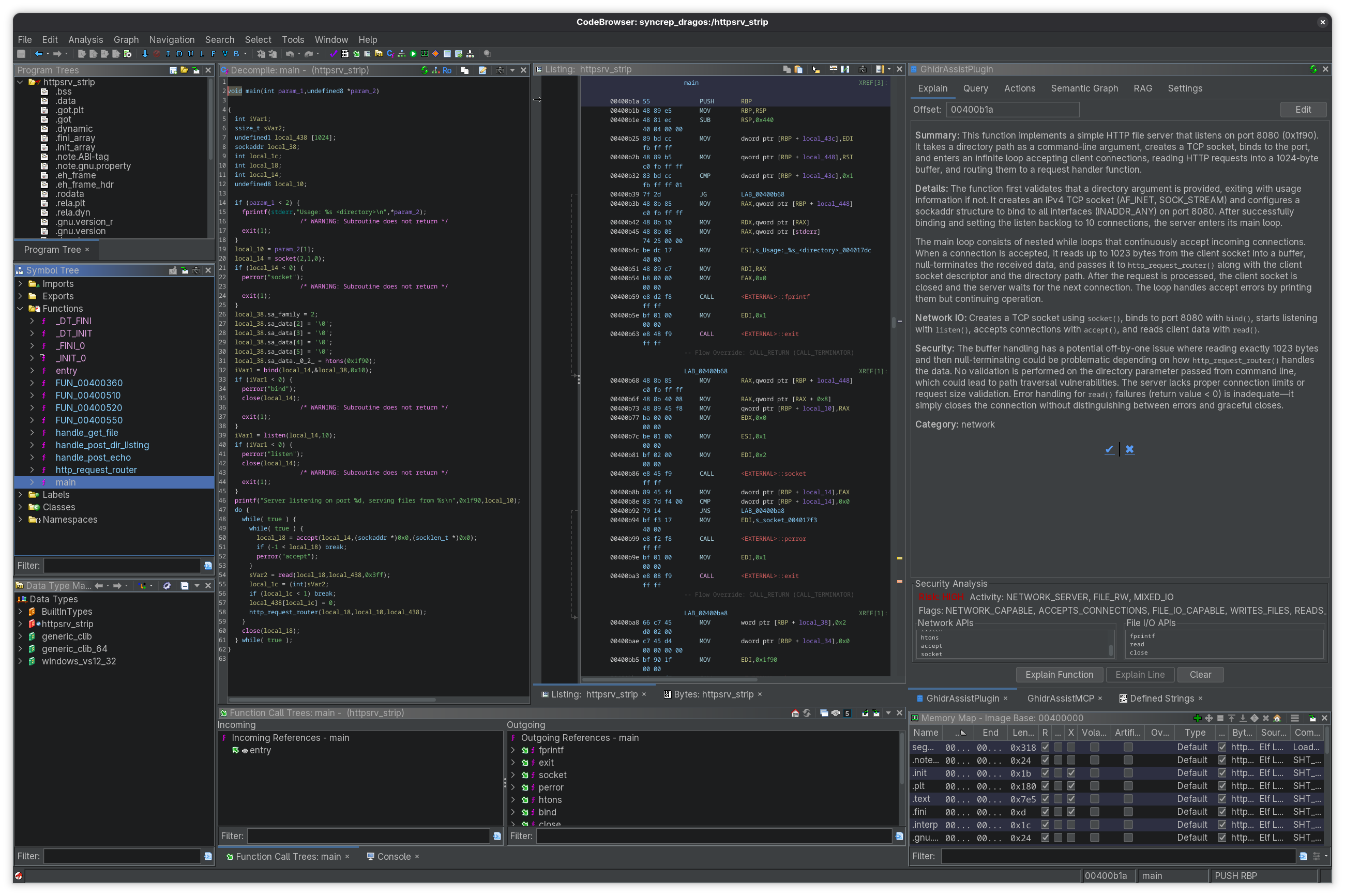
What is GhidrAssist?
GhidrAssist integrates large language models directly into your Ghidra workflow. Instead of switching between tools or copying code snippets, you can ask questions, generate explanations, and receive intelligent suggestions without leaving CodeBrowser.
The plugin supports local LLMs (Ollama, LM Studio) and cloud providers (OpenAI, Anthropic), letting you choose between privacy, cost, and performance.
Core Capabilities
GhidrAssist is organized into seven tabs, each focused on a specific aspect of LLM-assisted analysis:
| Tab | Purpose |
|---|---|
| Explain | Generate and store function explanations with security analysis |
| Query | Interactive chat with context macros and autonomous ReAct agent |
| Actions | LLM-powered suggestions for renaming, retyping, and struct creation |
| Semantic Graph | Build a knowledge graph of function relationships and security properties |
| RAG | Manage external documentation for context-enhanced queries |
| SymGraph | Compare against SymGraph, import shared analysis, and publish your own revisions |
| Settings | Configure LLM providers, MCP servers, and plugin options |
Key Features
MCP Tool Integration
GhidrAssist supports the Model Context Protocol (MCP), allowing LLMs to interact with Ghidra through tool calls. When MCP is enabled, the LLM can:
- Navigate to functions and addresses
- Retrieve decompiled code and disassembly
- Query cross-references
- Access the semantic graph
- Use external MCP servers for specialized tooling
GhidrAssist can connect to remote MCP servers over SSE or Streamable HTTP, and it can launch local MCP tools directly over stdio.
See the Query Workflow for details on using MCP tools.
ReAct Autonomous Agent
For complex investigations, GhidrAssist includes a ReAct (Reasoning + Acting) agent that can autonomously:
- Plan an investigation based on your question
- Execute multiple tool calls to gather information
- Reflect on findings and adapt its approach
- Synthesize a comprehensive answer
This is useful for exploratory questions like "What does this binary do?" or "Trace the data flow from user input."
Extended Thinking
For models that support it (Claude Sonnet 4+, OpenAI o1/o3, local reasoning models), GhidrAssist provides reasoning effort control:
| Level | Use Case |
|---|---|
| None | Quick queries, simple questions |
| Low | Light reasoning tasks |
| Medium | Moderate complexity analysis |
| High | Deep analysis, complex vulnerability research |
Higher reasoning effort allows the model more "thinking time" but increases latency and cost.
Semantic Graph
Build a rich knowledge graph of your binary that captures:
- Function summaries and purposes
- Call relationships
- Security flags (network, file I/O, crypto, etc.)
- Taint flow paths for vulnerability detection
- Function communities and modules
The graph can be queried directly or used to enhance LLM responses.
SymGraph Cloud Sharing
Share your analysis with the community through SymGraph:
- Push function names, types, and semantic graph data
- Pull existing analysis from other researchers
- Resolve conflicts between local and cloud symbols
Supported LLM Providers
GhidrAssist supports a wide range of LLM providers:
| Provider Type | Description |
|---|---|
| Ollama | Local LLM inference (recommended for privacy) |
| LM Studio | Local models with GUI |
| Open WebUI | Self-hosted web interface |
| OpenAI Platform API | GPT-5+, GPT-4o, o1, o3, o4 with API key |
| OpenAI OAuth | ChatGPT Pro/Plus subscription |
| Anthropic Platform API | Claude models with API key |
| Anthropic OAuth | Claude Pro/Max subscription |
| Anthropic CLI | Claude Code CLI wrapper |
| LiteLLM | Proxy for 100+ providers (AWS Bedrock, Azure, etc.) |
Recommended Models
- Reasoning-intensive tasks: Claude Sonnet 4+, OpenAI GPT-5.2, gpt-oss (extended thinking)
- General analysis: GPT-5.2-Codex, Claude Sonnet 3.5, DeepSeek, Llama-based models
- Local/private analysis: Ollama with gpt-oss, qwen2.5-coder, or codellama
Architecture Overview
GhidrAssist uses a Model-View-Controller architecture:
- Views: Swing-based UI components for each tab
- Controllers: Business logic and LLM orchestration
- Services: Reusable services for settings, analysis storage, RAG, and more
All LLM operations run in background tasks so the UI stays responsive, with streaming for real-time output.
Getting Started
Ready to start using GhidrAssist? See the Getting Started Guide for installation and configuration instructions.
Common Workflows
- Building Context with the Explain Tab
- Interactive Queries and the ReAct Agent
- Building a Semantic Graph