On this page
Semantic Graph Tab Reference
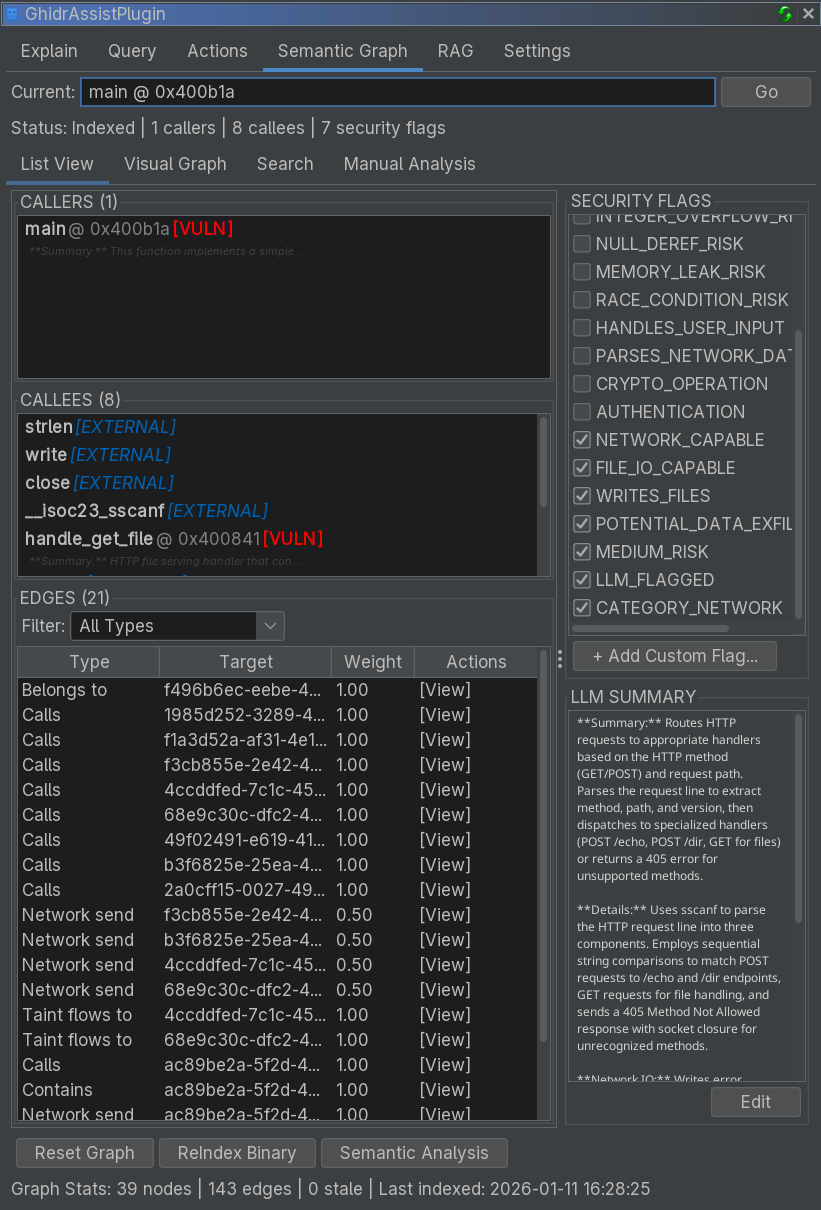
The Semantic Graph tab builds and explores a knowledge graph of your binary, capturing relationships, summaries, and security properties.
Purpose
The Semantic Graph provides:
- A call-graph-backed knowledge base
- LLM summaries and security annotations
- Taint analysis results for vulnerability detection
- Function communities for modular understanding
Sub-Tabs
List View
Displays indexed functions in a table:
- Address, name, summary, security flags, community labels
- Click a row to navigate to that function
- Caller/callee information is shown for the selected node
Visual Graph
Interactive graph visualization:
- Nodes are functions
- Edges are call relationships
- N-hop depth controls exploration
Search
Full-text search across summaries and annotations:
- Search by keywords or function names
- Results include relevant excerpt snippets
Manual Analysis
Provides fine-grained controls for analysis workflows.
Main Controls
At the bottom of the tab:
| Button | Description |
|---|---|
| Reset Graph | Clear all graph data for the current binary |
| ReIndex Binary | Build structure + security + network flow pipeline |
| Semantic Analysis | Run LLM summarization on stale/unsummarized nodes |
Manual Analysis Panel
Additional analysis operations:
| Button | Description |
|---|---|
| Security Analysis | Taint analysis for source-to-sink flows |
| Network Flow Analysis | Track data flow through network APIs |
| Community Detection | Group related functions using Label Propagation |
| Refresh Names | Sync graph node names with Ghidra function names |
Graph Statistics
The status line shows:
- Current index state
- Caller/callee counts
- Security flags count