On this page
Settings Tab Reference
The Settings tab configures LLM providers, MCP servers, SymGraph, and analysis options for GhidrAssist.
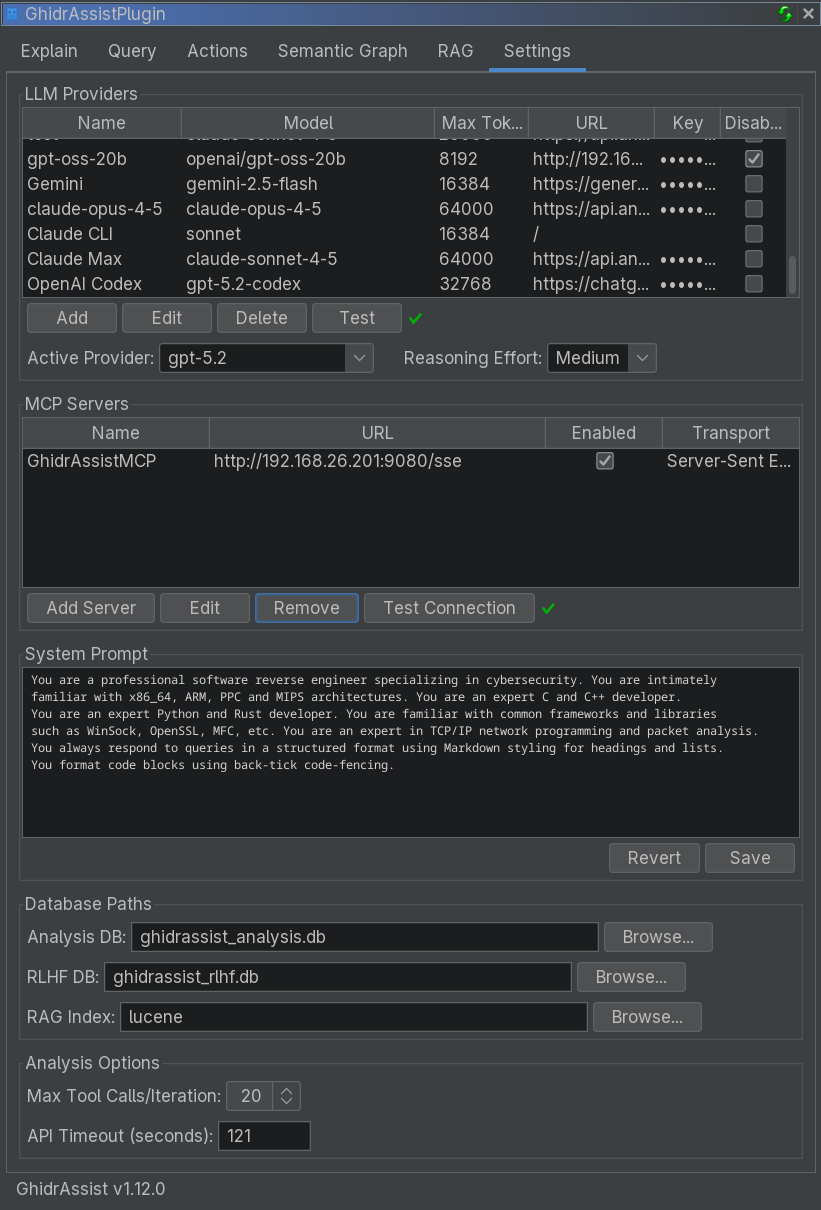
LLM Providers Section
This section manages the LLM providers that power GhidrAssist.
Provider Table
| Column | Description |
|---|---|
| Name | Display name for the provider |
| Model | Model identifier (e.g., gpt-4o, claude-sonnet-4-20250514) |
| Max Tokens | Maximum tokens per request |
| URL | API endpoint URL (may be empty for defaults) |
| Key | API key (masked) |
| Disable TLS | Skip TLS verification (for local development) |
Provider Management Buttons
- Add: Create a new provider configuration
- Edit: Modify the selected provider
- Duplicate: Duplicate the selected provider
- Delete: Remove the selected provider
- Test: Verify the selected provider
Active Provider and Reasoning Effort
Below the table:
- Active Provider dropdown chooses which provider is used for all operations
- Reasoning Effort controls extended thinking depth (None / Low / Medium / High)
| Level | Description |
|---|---|
| None | Standard response mode |
| Low | Light reasoning |
| Medium | Moderate reasoning |
| High | Deep analysis |
Provider Types
| Type | Description | Auth |
|---|---|---|
| Ollama | Local Ollama server | None |
| LM Studio | Local LM Studio server | None |
| Open WebUI | Self-hosted Open WebUI | Optional key |
| OpenAI Platform API | OpenAI official API | API key |
| OpenAI OAuth | ChatGPT Pro/Plus subscription | OAuth |
| Anthropic Platform API | Anthropic official API | API key |
| Anthropic OAuth | Claude Pro/Max subscription | OAuth |
| Anthropic CLI | Claude Code CLI wrapper | CLI auth |
| LiteLLM | LiteLLM proxy server | API key |
Add/Edit Provider Dialog
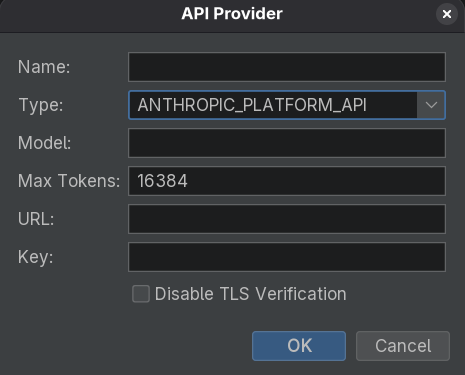
Common fields:
- Name: Display name
- Type: Provider type
- Model: Model identifier
- Max Tokens: Max tokens per request
Type-specific fields:
- URL: Required for Ollama/LM Studio/Open WebUI/LiteLLM
- API Key: Required for platform APIs
- Authenticate: OAuth providers
MCP Servers Section
Configure Model Context Protocol (MCP) servers that provide tools.
MCP Server Table
| Column | Description |
|---|---|
| Name | Server name |
| URL | Server endpoint |
| Enabled | Whether the server is active |
| Transport | HTTP / SSE / Stdio |
MCP Management Buttons
- Add Server: Configure a new MCP server
- Edit: Modify selected server
- Duplicate: Duplicate the selected server
- Remove: Delete selected server
- Test Connection: Verify connectivity
Recommended MCP Server
GhidrAssistMCP provides Ghidra-specific tools:
- Function decompilation and disassembly
- Cross-references and navigation
- Symbol lookup
- Semantic graph queries
SymGraph Section
Configure the SymGraph cloud service for symbol sharing.
Fields:
- API URL: Default
https://api.symgraph.com - API Key: Required for push/pull operations
- Show/Hide: Toggle visibility
- Test Connection: Verify credentials
SymGraph accounts are required for push/pull operations. See the SymGraph Workflow.
System Prompt Section
Customize the system prompt sent to the LLM.
- Save: Persist prompt
- Revert: Reset to default
Use the system prompt to customize analysis style or domain context.
Database Paths Section
Configure local storage paths:
| Database | Purpose | Default |
|---|---|---|
| Analysis DB | Stores explanations, graph data | ghidrassist_analysis.db |
| RLHF DB | Stores feedback data | ghidrassist_rlhf.db |
| RAG Index | Lucene index directory | ghidrassist_lucene |
Analysis Options Section
Additional analysis controls:
- Max Tool Calls/Iteration: Limits tool calls in ReAct loops
- API Timeout (seconds): Request timeout for LLM APIs
Related Documentation
- Getting Started
- Query Tab - MCP usage
- SymGraph Tab - SymGraph operations
- RAG Tab - Document management